A beginner opens six futures charts: 1-minute, 2-minute, 5-minute, 15-minute, hourly, daily. The 1-minute says buy. The 15-minute says wait. The hourly says the trade is pressing into resistance. Ten seconds later, the beginner takes the 1-minute signal anyway and calls it "confirmation."
That is not confirmation. That is chart shopping.
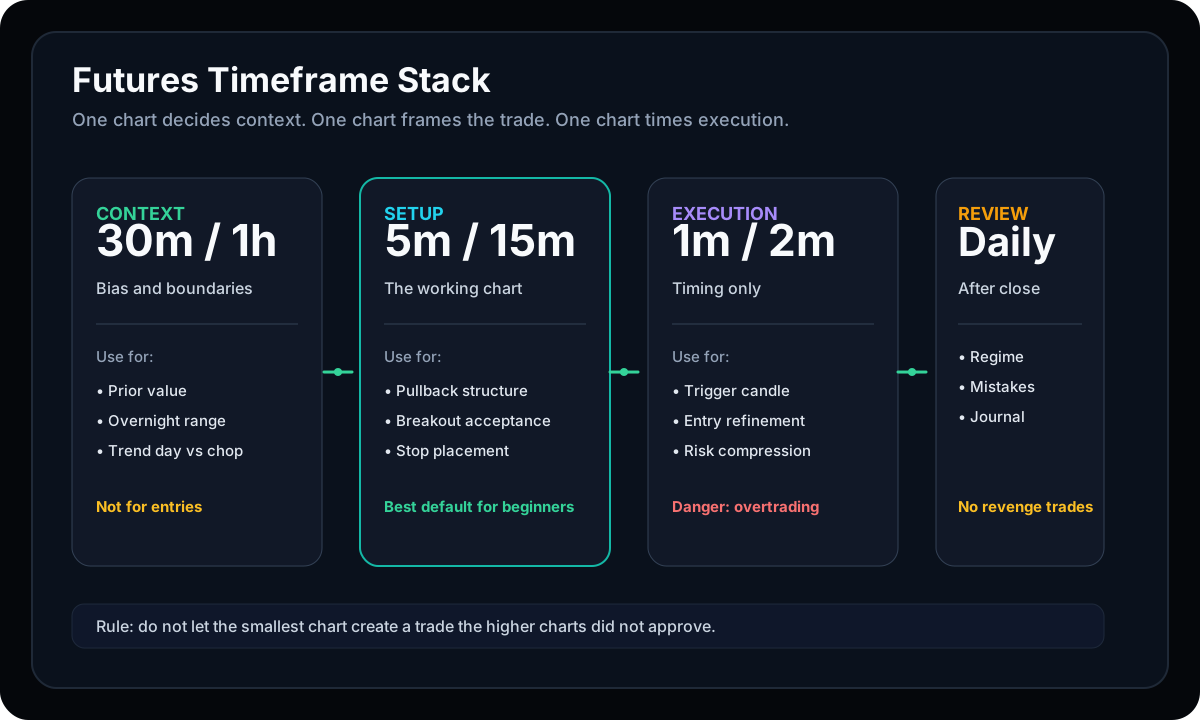
The best timeframe for futures day trading is not a magic interval. It is a stack: one chart for context, one chart for the setup, and one chart for execution. Each chart gets one job. When every chart is allowed to vote on everything, the trader loses before the trade starts.
The Short Answer
For most futures day traders, the cleanest default is:
- 30-minute or 1-hour chart: context, regime, overnight range, and major levels.
- 5-minute or 15-minute chart: the main setup chart.
- 1-minute or 2-minute chart: entry timing only.
- Daily chart: review, bigger trend, and important levels before the session.
If you trade ES, NQ, MES, or MNQ, this stack is enough. The problem is usually not lack of chart intervals. The problem is assigning the wrong job to the chart in front of you.
Start With the Setup Timeframe
The setup chart is the chart you are willing to be judged by in the trading journal.
For most futures day traders, that means the 5-minute or 15-minute chart. These intervals are slow enough to reduce random flicker, but fast enough to show intraday structure. They can show whether price is accepting above value, rejecting a level, building a higher low, or failing a breakout.
| Timeframe | Best Job | Common Mistake |
|---|---|---|
| 1-minute | Entry timing | Letting noise become a thesis |
| 5-minute | Scalps and short intraday setups | Taking every candle pattern |
| 15-minute | Cleaner day-trade structure | Entering late after the move is mature |
| 30-minute / 1-hour | Bias and regime | Using it for exact entries |
| Daily | Major levels and review | Ignoring it on event-heavy days |
Use the Higher Timeframe to Stop Bad Trades
The higher timeframe is not there to make you feel sophisticated. It is there to veto poor location.
Before the opening drive, use the 30-minute, 1-hour, or daily chart to mark:
- Prior day high and low.
- Overnight high and low.
- Prior value area and POC if you use Volume Profile.
- Obvious trend or balance conditions.
- Major news windows and session timing.
This is why the futures pre-market checklist matters. A 5-minute buy setup into higher-timeframe resistance is not the same trade as a 5-minute buy setup breaking from clean acceptance.
The 1-Minute Chart Is a Tool, Not a Boss
The 1-minute chart feels productive because it always has something to say. That is exactly why it gets traders into trouble.
Use the 1-minute chart after the trade is already defined:
- The level is known.
- The invalidation is known.
- The target zone is realistic.
- The setup chart has already created the reason.
Then, and only then, the 1-minute chart can help with a tighter trigger. If the 1-minute chart is inventing the trade, close it.
This is the same discipline behind the 1-3 Candle Rule. A small timeframe should help timing. It should not talk you into chasing.
5-Minute vs 15-Minute: Which Is Better?
Use the 5-minute chart when the session is active, range is reasonable, and you need tighter stop definition. Use the 15-minute chart when the market is noisy, the 5-minute chart is chopping, or you need to see whether the move has real structure.
Decision Rule
If the 5-minute chart creates five different opinions in fifteen minutes, promote the decision to the 15-minute chart. You are not getting more precision. You are getting more noise.
For traders using micro futures position sizing, this matters because the timeframe changes stop distance. A 15-minute structure can require a wider stop than a 1-minute trigger. Wider stop means fewer contracts, even on micros.
Where Tick Charts Fit
Tick charts can be useful, especially in active futures markets, because they form bars from transaction count instead of clock time. That can help some traders see participation during fast periods.
But beginners should not start there. Tick charts can make the market feel cleaner while quietly removing the time context that helps you understand session rhythm. If you cannot trade a 5-minute chart with discipline, a tick chart will not fix the process.
Earn tick charts later. First, learn the basic stack.
Match Timeframe to Stop Size
A timeframe is also a risk decision. A 1-minute setup might have a small invalidation. A 15-minute setup might need room behind a larger structure. Neither is automatically better.
Before taking the trade, translate the chart into risk:
- Where is the trade wrong?
- How many points away is that?
- What is the dollar risk per contract?
- How many contracts fit the account risk?
If you are not doing that math, the timeframe choice is incomplete. Use the futures position size calculator before assuming a smaller chart makes the trade safer.
A Simple Timeframe Stack for ES, NQ, MES, and MNQ
Here is the clean version:
- Daily: mark the big levels before the session.
- 1-hour: decide whether the day is trending, balanced, or trapped between levels.
- 15-minute: identify the main intraday structure.
- 5-minute: frame the actual setup.
- 1-minute: refine the entry if the setup is already valid.
This stack works especially well when paired with the Volume Profile before-the-open map and POC vs VWAP context. Timeframes tell you how price is moving. Location tells you where that movement matters.
No-Trade Conditions
Timeframe discipline should remove trades.
- The 1-minute chart says go, but the 5-minute setup does not exist.
- The 5-minute chart says buy, but the higher timeframe is pressing into a major sell zone.
- The 15-minute stop is too wide for the account.
- The daily chart shows a major event or level directly in the way.
- You are switching intervals until one tells you what you want to hear.
When that happens, write the skipped trade in the journal. Good timeframe selection is not about finding more trades. It is about removing the weak ones.
Source and risk notes
- NinjaTrader's timeframe guide describes common intervals such as M1, M3, H1, and D1 and notes that each shows a different view of market behavior: Trading Timeframes Guide.
- NinjaTrader's chart timeframe guide lists 1-minute, 3-minute, or tick charts for scalping, 5-minute to 15-minute charts for day trading, and 1-hour to daily charts for swing trading: How to Apply Timeframes in NinjaTrader Charts.
- CME's Micro E-mini S&P 500 page states that MES is $5 times the S&P 500 Index with a minimum tick of 0.25 index points: Micro E-mini S&P 500 futures.
- CME's Micro E-mini Nasdaq-100 page states that MNQ is $2 times the Nasdaq-100 Index with a minimum tick of 0.25 index points: Micro E-mini Nasdaq-100 futures.
- The CFTC warns traders to understand futures market risks before acting on tips or market hype: CFTC customer advisory.
- This article is educational. A timeframe stack can improve decision quality, but futures remain leveraged products; slippage, volatility, margin changes, and execution errors can create losses beyond the planned trade idea.
Final rule: the smallest chart can time the trade, but it cannot create the trade. Start with context, frame the setup, execute only after the reason exists, and review the decision after the close. That is how timeframes become a process instead of a distraction.
Build the STS chart stack in order
Timeframes work best when they serve the system: higher timeframe for context, setup chart for structure, execution chart for timing.