Skip to content
v3 redesign is live — welcome to the trading cockpit.
Market updates, stock news, and futures insights — 3x/week, freeSubscribe free
Skip to content
build.logtraders.online=2,166trades.60s=74swings.ranked=308edge.latency_ms=42ms
Back to Blog
System Design

NinjaTrader Automated Trading: From First Script to Live Deployment

S
Sage

Head of Trading Education

9 min read
NinjaTrader Automated Trading: From First Script to Live Deployment

I have three automated strategies running live on NinjaTrader right now. One trades ES, one trades NQ, one trades CL. Together they've taken 1,247 trades in the last 12 months. I didn't execute a single one of them manually. The strategies woke up at 9:30 AM, traded their rules, and shut down at 4:00 PM while I was doing other things — including building this platform.

But here's the part nobody talks about: those three strategies took 18 months to build. Not because NinjaScript is hard — it's C#, and the learning curve is manageable. Because the gap between "strategy that works in backtest" and "strategy that works unattended with real money" is enormous. This guide is about that gap.

The bad belief this post is killing: automation removes trading risk. It does not. Automation removes discretion. If your rules are bad, your code will execute those bad rules with perfect discipline and no shame. A robot can absolutely blow up an account. It just does it without sweating.


Why Automate (and Why Not)

Automation doesn't make trading easier. It makes trading more honest.

When you're manual, there's always an excuse: "I saw the setup but hesitated." "I took the trade but moved my stop." "I sized up because it felt right." Automation removes all of that. The strategy does exactly what you told it to — every time. If the results are bad, it's not the strategy's fault for "not following the plan." It's your fault for building a plan that doesn't work.

That level of accountability is uncomfortable. It's also the fastest path to a real edge. Every trade is logged with exact entry reason, exit reason, and fill quality. The trade journal fills itself. Your weekly review becomes a data analysis exercise instead of a memory reconstruction exercise.

What Automation Actually Exposes

Manual Excuse Automated Truth Next Action
"I hesitated."entry rule is measurabletest timing
"Bad fill."slippage is quantifiablemodel costs
"Market changed."regime drift shows in statspause/filter
"I would have exited."exit logic was not codedfix rules

Don't automate if:

  • You haven't validated the strategy manually first (automation amplifies edge and errors equally)
  • You can't code or aren't willing to learn (outsourcing strategy development rarely works — the developer doesn't understand your edge)
  • You want to "set it and forget it" (automated strategies need monitoring, regime awareness, and periodic re-validation)

NinjaScript Architecture

NinjaScript is built on C#. If you've written any code in Java, C++, or even Python, the syntax will feel familiar. The coding fundamentals module in the free curriculum covers the basics.

The Strategy Lifecycle

SetDefaults Configure DataLoaded Historical Realtime Parameters Data series Indicators Backtest bars Live ticks OnBarUpdate() fires on every bar in Historical and Realtime

The critical transition is Historical → Realtime. In Historical mode, OnBarUpdate() fires on completed bars from your data set. In Realtime, it fires on live ticks. If your strategy uses Close[0] for decisions, that value is final in Historical mode but changing in Realtime. This is the #1 source of backtest-to-live discrepancy.

The Minimal Strategy Template

// OnBarUpdate — where your logic lives
protected override void OnBarUpdate()
{
    // Safety: wait for enough bars
    if (CurrentBar < BarsRequiredToTrade) return;

    // Safety: only trade during RTH
    if (ToTime(Time[0]) < 93000 || ToTime(Time[0]) > 155500)
        return;

    // Entry logic — POC bounce with QPulse confirm
    bool nearPOC = Math.Abs(Close[0] - yesterdayPOC) < pocTolerance;
    bool qpulseBullish = qpulse[0] > 0 && qpulse[1] <= 0;

    if (nearPOC && qpulseBullish && Position.MarketPosition == MarketPosition.Flat)
    {
        EnterLong(1, "POC Bounce");
        SetStopLoss("POC Bounce", CalculationMode.Ticks, stopTicks, false);
        SetProfitTarget("POC Bounce", CalculationMode.Ticks, targetTicks);
    }
}

That's a real strategy skeleton — not the SMA crossover you see in every tutorial. It enters long when price is near yesterday's POC and QPulse crosses zero. Notice three things: RTH session filter, immediate stop-loss placement, and named signal for journaling. These aren't optional — they're the difference between a script and a system.


The 5 Rules of Live Deployment

I learned these the expensive way. Each rule exists because I violated it and paid for the lesson.

# Rule Why (What I Broke)
1 Always use SetStopLoss() Strategy had a bug that skipped the exit logic. Without a hard stop, the position ran for 47 minutes with no protection. Lost $1,800 on CL.
2 Start with 1 contract Backtest showed 4 contracts was optimal. Live slippage at 4x was 3 ticks instead of 1. Three weeks of gains erased in 2 sessions.
3 Monitor the first 5 sessions live Assumed the strategy was fine because backtest was good. Didn't notice it was entering 3 minutes late in Realtime due to a Calculate=OnBarClose setting.
4 Set daily loss limits in code Strategy hit a bad regime and took 7 consecutive losers. Without DailyLossLimit, it would have kept firing until flatline.
5 Practice the kill switch Strategy entered a position during a VIX spike. I panicked, hit the wrong button, and doubled the position instead of closing it.

The Calculate Property Trap

This is the single most common source of backtest-to-live discrepancy in NinjaTrader, and it took me 3 months to diagnose it in my own code.

NinjaTrader strategies have a Calculate property with three options:

Setting When OnBarUpdate fires Backtest behavior Live behavior
OnBarClose Once per bar, after bar closes Close[0] is the final bar close Close[0] is the final bar close
OnEachTick On every incoming tick Simulated — fires once per bar! Fires on every real tick
OnPriceChange When price changes (not every tick) Simulated — fires once per bar! Fires on price change

See the trap? If you use OnEachTick, your backtest fires OnBarUpdate once per completed bar — but live, it fires on every tick (hundreds of times per bar). Your strategy logic executes completely differently in backtest vs live. Entry timing, indicator values, everything shifts.

My rule: always use OnBarClose unless you have a specific, tested reason for tick-level processing. OnBarClose behaves identically in backtest and live. That consistency is worth more than the theoretical advantage of faster entries.

When Automation Lies to You

Automation lies when the backtest environment is cleaner than the live environment. Historical bars do not panic, disconnect, partially fill, change session templates, or slip three ticks during a data release. Live markets do. If your strategy cannot survive those boring mechanical details, it is not automated trading. It is a demo with a brokerage account attached.

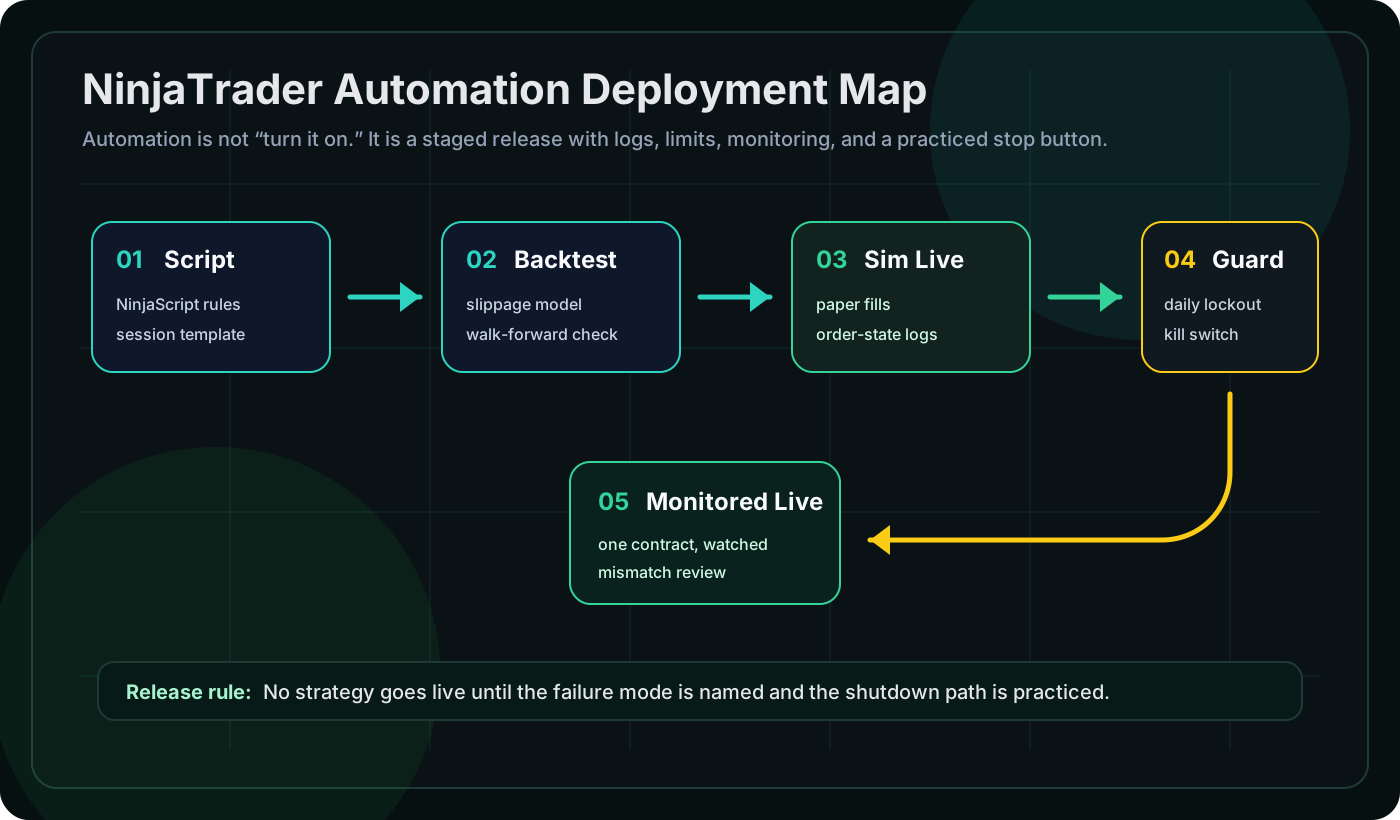
My filter: no automated strategy goes live until it has passed walk-forward validation, paper traded for 30 sessions, logged every fill, and run through a manual kill-switch drill. If you have not practiced stopping the machine, you are not ready to start it.

The Common NinjaScript Bugs That Cost Real Money

I've catalogued every bug that hit me or a Nexural community member in live trading. These are the top 5:

Bug 1: Missing BarsRequiredToTrade Guard

If your strategy uses SMA(20) but doesn't check if (CurrentBar < 20) return;, it will try to calculate the SMA with insufficient data on the first 19 bars. In backtest this silently returns 0. In live, during the first 20 bars after the strategy loads, it can trigger false entries. I had this bug fire 3 entries in the first minute of RTH before the SMA had enough data to be meaningful.

Bug 2: Not Checking State.Realtime

During strategy initialization, NinjaTrader replays historical bars through your OnBarUpdate before switching to realtime. If your strategy sends an email alert or logs to an external service in OnBarUpdate, you'll get hundreds of false alerts from historical replay. Guard external actions with if (State != State.Realtime) return;.

Bug 3: Position Check Race Condition

Position.MarketPosition doesn't update instantly after EnterLong(). If your next OnBarUpdate fires before the fill arrives (common in fast markets), the position still reads Flat and your strategy enters again — doubling the position. Use order tracking via OnExecutionUpdate or check entryOrder != null.

Bug 4: Hardcoded Session Times

if (ToTime(Time[0]) > 93000) looks correct for 9:30 AM. But during DST transitions, NinjaTrader's time handling can shift by an hour if your data provider sends timestamps in a different timezone than your chart. I lost $600 on a CL trade that entered at 8:30 AM thinking it was 9:30 AM during the November DST change. Use NinjaTrader's session template API instead of hardcoded times.

Bug 5: Not Handling Partial Fills

If you enter with EnterLong(3) requesting 3 contracts and only get filled on 2, your SetStopLoss and SetProfitTarget are set for the full 3. The unfilled contract eventually gets cancelled, but your stops are now wrong for the 2-contract position. Always validate fill quantity in OnExecutionUpdate.

Multi-Timeframe Strategies: The Right Way

The STS system uses two timeframes: 3-minute for entries and 15-minute for context. In NinjaScript, you add a second data series in Configure:

// In State.Configure:
AddDataSeries(BarsPeriodType.Minute, 15);

// In OnBarUpdate:
if (BarsInProgress == 0) // 3-min bar update
{
    // Entry logic on primary series
    if (higherTfTrend == "bullish" && nearPOC && qpulseBullish)
        EnterLong(1, "STS Long");
}
else if (BarsInProgress == 1) // 15-min bar update
{
    // Update trend context from higher timeframe
    higherTfTrend = Closes[1][0] > SMA(Closes[1], 20)[0]
        ? "bullish" : "bearish";
}

The critical rule: never enter orders from BarsInProgress == 1. The secondary series updates asynchronously. Orders placed from the wrong BarsInProgress can fill at unexpected prices. Always use the secondary series for context and the primary series for execution.

From Script to System

A NinjaScript file isn't a system. A system is:

  • Strategy logic — entry/exit rules (the NinjaScript part)
  • Risk managementposition sizing, stop placement, max daily/weekly loss
  • Validationwalk-forward, Monte Carlo, deflated Sharpe
  • Monitoring — live vs. backtest drift detection, alerting, performance tracking
  • Review process — weekly journal review, monthly strategy audit, regime assessment
  • Kill criteria — predefined conditions for pausing the strategy (drawdown threshold, consecutive losses, regime shift)

I track every automated trade in the Nexural trade journal. The auto-import captures every fill with the signal name ("POC Bounce", "VAH Rejection"), so my weekly review shows exactly which automated setups are performing and which are decaying. When a strategy's rolling 30-session R-multiple drops below 0.1R, it gets paused for investigation.

Here's what that monitoring actually looks like in practice. My ES strategy ran for 6 months at an average of 0.38R per trade. Then in November 2025, the rolling R dropped to 0.12R over 3 weeks. The GEX regime had shifted from predominantly positive (mean reversion) to predominantly negative (trending). The strategy was optimized for mean reversion — it was taking POC bounces in a trending market where POC bounces fail. I paused it for 2 weeks, waited for GEX to stabilize, and reactivated with a regime filter that checks GEX posture before allowing entries.

The Nexural automation platform provides the monitoring and review layers. The NinjaTrader module in the free curriculum walks through building each layer with code examples. The indicator suite provides the building blocks (Volume Profile, QPulse, Flow Pro) that the STS strategies are built on.

Start with the free tools. When the strategy proves itself across 30+ paper trading sessions, upgrade to the Creator tier for the full research and validation pipeline.

Final rule: automation is not permission to stop thinking. It is a contract with your own rules. Write better rules, test them harder than your ego wants, and keep a kill switch close enough that you can hit it before the market teaches the lesson for you.

#ninjatrader#automation#NinjaScript#strategy-development#algo-trading
Share this articleTwitterLinkedIn

Ready to Trade Smarter?

Join thousands of traders using Nexural to find asymmetric setups and trade with edge.

Get Started Free